


이지스팟디텍터
배터리, 종이, 필름 또는 유리 산업을 위한 고급 표면 검사
- 잡음이 많은 이미지에서도 희미한 결함 및 오염 감지
- 인라인 검사를 위한 빠른 처리
- 라인 스캔 카메라 및 2D 카메라로부터의 획득과 호환
- 부품 가장자리의 관심 영역 사전 정렬 옵션
- 결함에 대한 딥 러닝 분류 옵션
- 간단하고 포괄적인 C++, C# 및 Python API
설명
실시간 처리 기반 인라인 표면 검사
이중 단계 접근 방식을 통해 EasySpotDetector는 다른 딥러닝 기반 객체 분할 처리보다 빠릅니다. Intel i7-10850H 컴퓨터에서 EasySpotDetector는 초당 최대 200메가픽셀(MPixels)을 처리할 수 있습니다(탐지 기능만 해당). 분류 작업은 GPU 연산을 활용할 수 있지만, OpenVINO 덕분에 CPU에서도 최적화되어 실행됩니다.
결함 분할을 제어하기 위한 매개변수 세트
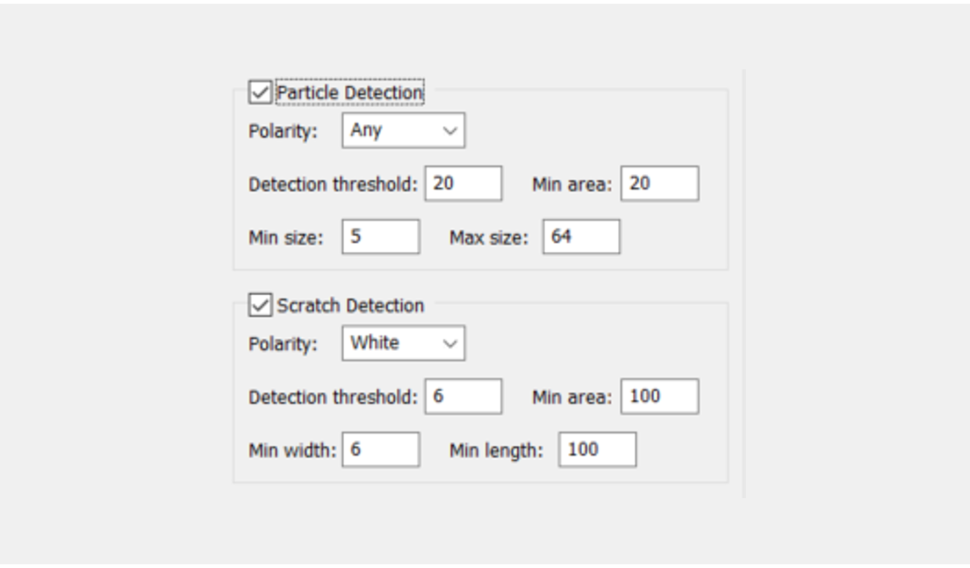
명시적 매개변수 세트를 통해 사용자는 특정 결함을 표적으로 지정할 수 있습니다. 결함의 유형(입자, 스크래치 등), 특성(밝은 결함, 어두운 결함 또는 양쪽 모두), 크기, 최소 대비(강한 결함 또는 희미한 결함)를 조정할 수 있습니다.
간결하고 포괄적인 API
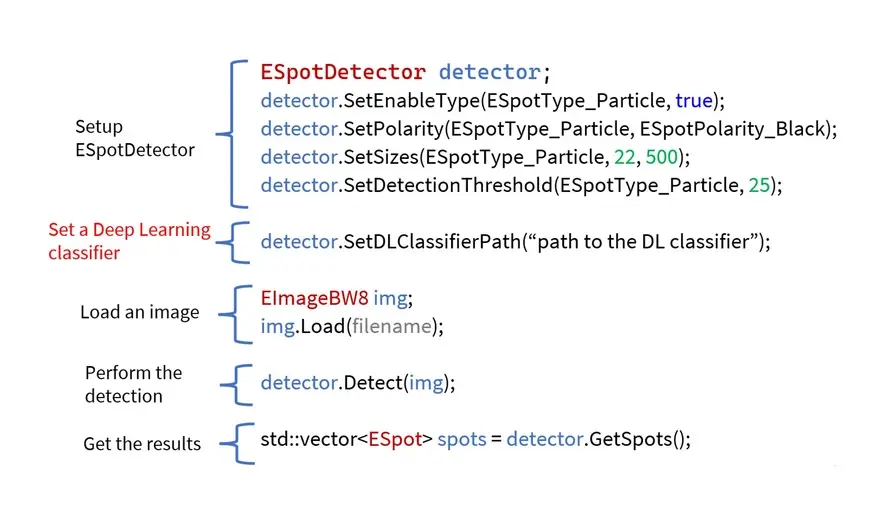
EasySpotDetector는 관심 영역(ROI) 정렬, 표면 결함 탐지 및 사용자 정의 훈련된 딥 러닝 분류기를 통한 분류를 위한 단일 API를 제공합니다.

맞춤형 훈련된 딥러닝 객체 분류기
탐지된 객체는 딥 러닝 분류기에 제출될 수 있습니다. 이 분류기는 사용자가 사용자 친화적인 딥 러닝 스튜디오를 사용하여 자신의 특정 애플리케이션에 맞게 훈련시킵니다. 분류기의 가능한 용도는 다음과 같습니다:
- 탐지된 후보를 확인하거나 무효화합니다.
- 결함의 심각도 수준 평가.
- 검출된 객체를 외관 특성에 따라 여러 클래스로 분류합니다.
다양한 사용 사례에서 테스트됨

이지스팟디텍터는 다음과 같은 여러 표면 검사 응용 분야에서 성공적으로 테스트되었습니다: 배터리 포일, 직물, 강철, 수동 전자 부품 및 천연 재료(예: 가죽, 목재).
이지스팟디텍터 일러스트레이션
New Open eVision Studio
그래픽 인터페이스를 사용하여 복잡한 이미지 처리 시퀀스를 설계할 수 있습니다. 이 도구 모음은 Open eVision 라이브러리의 다양성과 기능을 대표합니다. 처리 파이프라인에 해당하는 C++, Python 및 C# 소스 코드는 자동으로 생성되며 Open eVision API에 대한 대화형 문서를 제공합니다. New Open eVision Studio는 GigE Vision 카메라, Coaxlink 프레임 그래버 또는 eGrabber 레코더 시퀀스와 같은 실시간 이미지 소스를 처리할 수 있습니다.
본 애플리케이션은 무료로 제공되며, Windows 및 Linux에서 실행 가능하며 Intel 및 ARM 64비트 아키텍처와 호환됩니다.


Software
- Host PC Operating System
-
Supported operating systems:
Microsoft Windows 11, 10 for x86-64 (64-bit) processor architecture
Microsoft Windows 11, 10 IoT Enterprise for x86-64 systems
Linux for x86-64 (64-bit) and ARMv8-A (64-bit) processor architectures with a glibc version greater or equal to 2.18
Minimum requirements:
8 GB RAM
Optional NVidia GPU
- APIs
-
Supported programming languages :
The Open eVision libraries and tools support C++, Python and the programming languages compatible with the .NET (C#, VB.NET)
C++ requirements: A compiler compatible with the C++ 11 standard is required to use Open eVision
Python requirements: Python 3.11 or later is required to use the Python bindings for Open eVision
.NET requirements: .NET framework 4.8 (or later) or the .NET platform 6.0 (or later) are supported
Supported Integrated Development Environments:
Microsoft Visual Studio 2017 (C++, C#, VB .NET, C++/CLI)
Microsoft Visual Studio 2019 (C++, C#, VB .NET, C++/CLI)
Microsoft Visual Studio 2022 (C++, C#, VB .NET, C++/CLI)
QtCreator 4.15 with Qt 5.12
- Input
-
Image source:
Any 8-bit grey scale image, no size limit
Region of interest:
Explicit or automatic selection of the region of interest (an oriented rectangle is fitted to the part’s edges)
- Output
-
A list of detected spots with their type (particle or scratch), position and size, strength, and pixel level segmentation map
Optionally, if a deep learning classifier is loaded, a class and a probability is set for each spot. The deep learning classifier is a trained EasyClassify tool.
Display functions are provided to draw the spot bounding boxes and segmented pixel
- Performance
-
Processing speed on single core Intel i7-10850H:
Particle detection only: 200 MPixels/s
Particle and scratch: 60 MPixels/s
- Requirements
-
Minimum defect size:
2x2 pixels
No maximum defect size
Ordering Information
- Product status
-
Released
- Product code - Description
-
PC4190 Open EasySpotDetector for USB dongle
PC4340 Open eVision EasySpotDetector
- Related products
-
PC6512 eVision/Open eVision USB Dongle (empty)
PC6514 Neo USB Dongle (empty)